filecoin-pin
Filecoin Pin

Store IPFS content on Filecoin's decentralized storage network with verifiable persistence.
Status
Ready for persistent, verifiable data on Filecoin Mainnet.
Register for updates and a later 2026 Q2 GA announcement at filecoin.cloud.
What is Filecoin Pin?
Filecoin Pin is a fully decentralized persistence layer for IPFS content using the global network of Filecoin storage providers with cryptographic guarantees.
When you use Filecoin Pin, your IPFS data gains:
- Verifiable persistence - Storage providers must cryptographically prove daily that they continue to store and serve your data
- Economic incentives - You only pay when storage proofs are successfully delivered and verified onchain
- Decentralized infrastructure - Your data can be stored across a global network of independent storage providers
- Seamless IPFS integration - Continue using standard IPFS Mainnet tooling (e.g., Kubo, Helia, HTTP Gateways) while gaining Filecoin's persistence guarantees
- Sovereign data - Choose your providers, audit storage proofs and payments onchain, with no dependency on a single company
Who is Filecoin Pin for?
Filecoin Pin is designed for developers building on IPFS who need trustless, economically-incentivized persistence for their content. Whether you're building dApps, CI/CD workflows, static websites, AI agents, or other applications, Filecoin Pin provides the missing persistence layer for IPFS.
Affordances
Filecoin Pin offers multiple affordances to integrate Filecoin storage into your workflow:
💻 CLI
Upload IPFS files directly to Filecoin via the command line. Perfect for developers who want to integrate Filecoin storage into scripts, workflows, or local development environments.
- Status: Production-ready. It has been recommended to users for months, and is used extensively by the development team.
- Repository: This repo (filecoin-project/filecoin-pin)
- Documentation:
- Run
filecoin-pin --helpto see all available commands and options. - CLI Walkthrough
- Run
- Installation:
npm install -g filecoin-pin - Update notice: Every command quickly checks npm for a newer version and prints a reminder when one is available. Disable with
--no-update-check.
⚙️ GitHub Action
Automatically publish websites or build artifacts to IPFS and Filecoin as part of your CI/CD pipeline. Ideal for static websites, documentation sites, and automated deployment workflows.
- Status: Production-ready. Used in the filecoin-pin-website CI pipeline.
- Repository: This repo (see upload-action/)
- Documentation:
- Example in Production: filecoin-pin-website CI pipeline
📚 JavaScript Library
Use Filecoin Pin programmatically in your Node.js or browser applications. The library provides both a high-level API for common use cases and granular core modules for advanced customization.
- Status: Production-ready. Powers the CLI, GitHub Action, filecoin-pin-website, and FOC dealbot.
- Repository: This repo (filecoin-project/filecoin-pin)
- Documentation:
- API Reference (TypeDoc-generated documentation)
- High-level API:
import { … } from 'filecoin-pin'(recommended for most use cases) - Core modules:
import { … } from 'filecoin-pin/core/*'(CAR files, payments, Synapse SDK, uploads, UnixFS)
- Installation:
npm install --save filecoin-pin
📡 IPFS Pinning Server (Daemon Mode)
Run a localhost IPFS Pinning Service API server that implements the IPFS Pinning Service API specification. This allows you to use standard IPFS tooling (like ipfs pin remote) while storing data on Filecoin.
- Status: ⚠️ Beta — not intended for production use. Works and is tested but does not yet have the resource controls or hardening required to safely serve untrusted (or even semi-trusted) callers. State is held in memory and is lost across restarts. Feature parity with the CLI is partial. If running a pinning server would benefit your use case, please comment on the tracking issue so we can prioritize.
- Repository: This repo (
filecoin-pin servercommand in CLI) - Usage:
PRIVATE_KEY=0x... ACCESS_TOKEN=... npx filecoin-pin server(or use session key auth — see Configuration) - Authentication: The server refuses to start unless an access token is configured via
--access-token/ACCESS_TOKEN. Clients then authenticate withAuthorization: Bearer <token>on every request exceptGET /. To run the server open to all requests (not recommended), pass--allow-no-auth/ALLOW_NO_AUTH=true. delegatesis always empty: Each pin spins up its own short-lived Helia node that is stopped as soon as the pin operation finishes, so there is no long-lived node to advertise. Thedelegatesarray in pin responses is therefore always[].
⚠️ Known limitations and operational guidance
The pinning server is currently safe to run only in trusted, single-operator environments. Specifically, it does not enforce any of the following:
- Per-request, per-user, or global rate limits on
POST /pins - Per-user quotas (active pins, total bytes pinned, transfer)
- Maximum DAG byte count, block count, or traversal depth
- Traversal timeout /
AbortControlleron pin operations - Concurrency cap across in-flight pin operations
- Filesystem quotas on the configured
CAR_STORAGE_PATH
As a result, a single caller can submit a CID resolving to a very large DAG (or supply a reachable origins peer that serves one) and exhaust disk, network, CPU, or libp2p resources on the host. Hardening this surface is tracked in #46 and will be a prerequisite for promoting the affordance out of beta.
Until then, operators should:
- Bind to
localhost(the default) and never expose the daemon directly to the public internet. - Treat the
ACCESS_TOKENas a single-tenant secret. Do not share it across users you don't fully trust to behave well; there's no per-token quota to contain misbehavior. - Do not enable
ALLOW_NO_AUTH=trueoutside of disposable local development. - Run on a host with bounded storage (e.g., a dedicated volume) so a runaway pin can't take down other workloads on the same machine.
📊 Management Console GUI
Web-based management console for monitoring and managing your Filecoin Pin deployments. This is effectively a Web UI equivalent to the CLI affordance.
- Status: Planned
- Tracking: See issue #74 for updates. Please leave a comment about your use case if this would be particularly beneficial.
Documentation
See /documentation.
Examples
See Filecoin Pin in action:
- upload-action - The supported GitHub Action for automated IPFS/Filecoin uploads in CI
- filecoin-pin-website - Demo dApp showing browser-based file uploads to Filecoin
- dealbot - Tool used by the FOC development team and Storage Provider community for automated storage deal testing and monitoring, demonstrating production use of the filecoin-pin library.
Architecture
The Big Picture
Filecoin Pin bridges IPFS and Filecoin to provide verifiable persistence for content-addressed data:
Filecoin Pin Structure
This repository contains multiple affordances for user interaction and a shared library for consistent functionality:
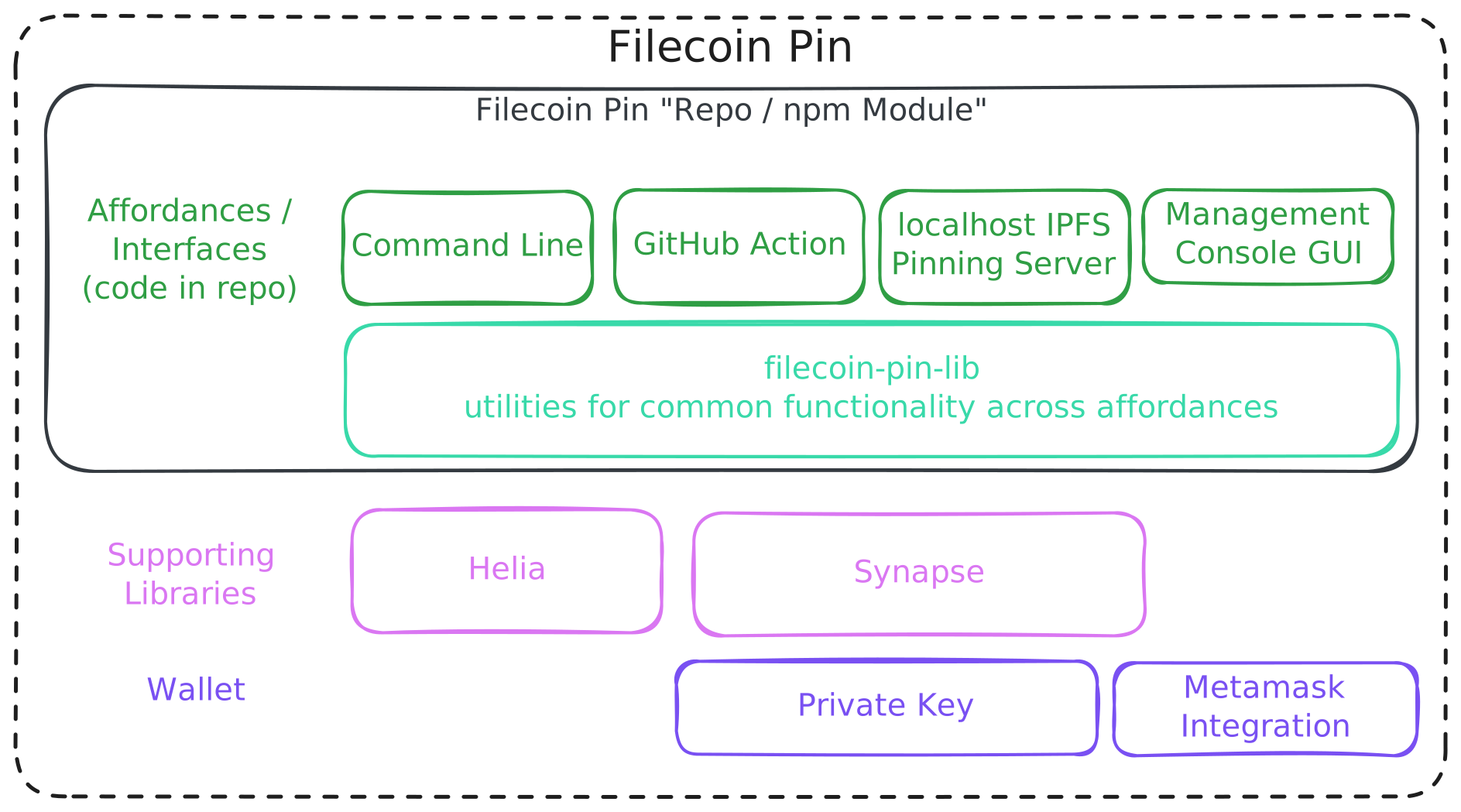
The Synapse SDK is the main library, as it's doing the work of interfacing with the rest of Filecoin Onchain Cloud including smart contracts, Filecoin Storage Providers, and more.
Helia is leveraged for turning files and directories into IPFS compatible data, which we output in CAR format.
The affordances were discussed more above. All affordances use the same core library, ensuring consistent behavior and making it easy to add new interfaces in the future.
Telemetry
Filecoin Pin collects telemetry. A few things:
- Telemetry always has a way to be disabled.
- We don't collect Personal identifiable information (PII).
- Telemetry is enabled by default for the affordances, requiring a consumer/user to opt out. We are defaulting as "enabled" to help make sure we have a good pulse on the user experience and can address issues correctly. Maintainers are particularly focused on validating functionality and ironing out problems throughout the whole Filecoin Onchain Cloud stack that
filecoin-pinrelies on.
What we collect:
-
Per-upload copy outcomes posted directly to BetterStack's HTTP metrics ingestion endpoint, so we can measure the success rate of multi-copy uploads and identify which storage providers (or pipeline steps) are failing. See
documentation/events-and-metrics.mdfor the full schema, including the underlying events and the relationship between this metric and the Synapse SDK's upload result. -
Console link attribution. The Filecoin Cloud console links the CLI prints (
login, funding top-up,logout,dashboard) carryutm_source,utm_medium,utm_term, andutm_content(the agent name from@vercel/detect-agent,human, orautomation), so the console's web analytics can attribute visits to the CLI and split human from agent traffic. Nothing is sent by filecoin-pin itself; the params travel in the URL you open. See Console Link Attribution.Delivery model. Each
executeUploadfires its own HTTP POST containing oneuploadCopyStatuscounter and one paireduploadCopyBytesgauge per resolved copy outcome — there is no in-memory buffer or periodic flush. The CLI, pinning server, and GitHub Actionawait flushTelemetry()before exit so any in-flight request finishes. Long-running consumers that terminate viaprocess.exit(),SIGINT, orSIGTERMshould do the same (flushTelemetryis exported fromfilecoin-pin/core/telemetry). To silence subsequentrecordUploadResultcalls without exiting the process, callconfigureTelemetry({ disabled: true }).Library usage (Node and browser). The telemetry library never reads
process.env. Configure it programmatically before the firstexecuteUpload— the same API works in both runtimes:import { configureTelemetry } from 'filecoin-pin/core/telemetry'
configureTelemetry({ disabled: true }) // opt out
configureTelemetry({ affordance: 'pin.filecoin.cloud' }) // tag the surface (default 'Library')The CLI's env-var support is built on top of this API (see
src/read-telemetry-config-from-env.ts); other Node hosts can follow the same pattern.
How to disable telemetry
- CLI / pinning server / GitHub Action: set
FILECOIN_PIN_TELEMETRY_DISABLED=true(or the cross-tool standardDO_NOT_TRACK=1) in the host environment / workflowenv:block. The Action also acceptsdisableTelemetry: trueas an input; either signal silences telemetry. - Library consumers: pass
{ disabled: true }toconfigureTelemetry().
Quick Start
Prerequisites
- Node.js 24+ for CLI and library usage
- Filecoin wallet (Calibration testnet or Mainnet) with:
- For Calibration testnet:
- Test FIL for transaction gas (Faucet)
- Test USDFC stablecoin for storage payments (USDFC Faucet)
- For Mainnet:
- FIL for transaction gas
- USDFC stablecoin for storage payments
- For Calibration testnet:
Installation
npm install -g filecoin-pin
Basic Usage
# 0. Set up authentication (choose one):
# Log in: filecoin-pin login
# Generates a session key for this machine and opens the Filecoin
# Cloud console, where you approve it with your wallet. Saved under
# the data directory (see "Default Data Directories"); `logout` removes it.
# Private key: export PRIVATE_KEY=0x...
# (or pass --private-key <key> to each command)
# Session key: export WALLET_ADDRESS=0x... SESSION_KEY=0x...
# WALLET_ADDRESS is the owner wallet address; SESSION_KEY is the
# session key PRIVATE key (not the session address), e.g. from a
# file downloaded from the console's Session keys page
# (or pass --wallet-address <addr> --session-key <private-key> to each command)
# Or load both from a downloaded file: filecoin-pin add --credentials-file <path>
# Advanced: `filecoin-pin session create|authorize|revoke|generate` manage session
# keys with the wallet private key (no browser). --scopes <ids> picks a
# subset (default: all). Ids: createDataSet, addPieces,
# schedulePieceRemovals, terminateService.
# 1. Configure payment permissions (one-time setup)
filecoin-pin payments setup --auto
# 2. Upload a file to Filecoin (defaults to Mainnet)
filecoin-pin add myfile.txt
# 3. Verify storage with cryptographic proofs
filecoin-pin data-set <dataset-id>
# To use Calibration testnet (not persistent) instead:
filecoin-pin add myfile.txt --network calibration
For detailed guides, see:
- CLI: Complete CLI walkthrough
- GitHub Action: CI/CD integration guide
Configuration
Configuration of the Filecoin Pin CLI can be performed either with arguments, or environment variables.
The Pinning Server requires the use of environment variables, as detailed below.
Network Selection
Filecoin Pin supports Mainnet, Calibration testnet, and local devnet networks. By default, the CLI uses Mainnet.
Using the CLI:
# Use Mainnet (default)
filecoin-pin add myfile.txt
# Explicitly specify Mainnet
filecoin-pin add myfile.txt --network mainnet
# Use Calibration testnet
filecoin-pin add myfile.txt --network calibration
# Use a local foc-devnet (reads config from devnet-info.json, details below)
filecoin-pin add myfile.txt --network devnet
Using environment variables:
# Set network via environment variable
export NETWORK=mainnet
filecoin-pin add myfile.txt
# Or override RPC URL directly
export RPC_URL=wss://wss.node.glif.io/apigw/lotus/rpc/v1
filecoin-pin add myfile.txt
Selection rules:
--networkand--rpc-url(and theirNETWORK/RPC_URLenv equivalents) are mutually exclusive. Passing both is an error.- When
--rpc-url(orRPC_URL) is set, Filecoin Pin probes the endpoint'seth_chainIdat startup and uses the matching chain (mainnet, calibration, or a configured devnet). - When neither is set, Filecoin Pin defaults to Mainnet.
Common CLI Arguments
-h,--help: Display help information for each command-V,--version: Output the version number-v,--verbose: Verbose output--private-key: Ethereum-style (0x) private key (wallet and signer), funded with USDFC--wallet-address: Session key mode: owner wallet address--session-key: Session key mode: the session key's private key (printed asSESSION_KEYbyfilecoin-pin session create/session generate), not the session address. Each command checks only the permissions it needs; see Session-Key Permissions below.--network: Filecoin network to use:mainnet,calibration, ordevnet(default:mainnet). Mutually exclusive with--rpc-url.--rpc-url: Filecoin RPC endpoint. Filecoin Pin probes itseth_chainIdto derive the chain. Mutually exclusive with--network.--credentials-file <path>: Load credentials (e.g.SESSION_KEY,WALLET_ADDRESS) from a dotenv-style file, e.g. a downloaded credentials file. Flags and environment variables always win over the file, across auth modes too:PRIVATE_KEYin the shell beats a session key pair in the file.
Other arguments are possible for individual commands, use --help to find out more.
Login
filecoin-pin login pairs this machine with a wallet without exporting a private key. It generates a session key, saves it to session.env in the data directory (owner-readable only) before anything else happens, prints a Filecoin Cloud console link, opens it in a browser on a terminal, and waits up to five minutes for the wallet owner to approve the key there. It ends with a readiness scorecard for uploads (key authorized, storage service approved, USDFC deposited) and a pre-filled console link when funding is still needed.
A grant lives on one chain, so the file records the network (mainnet or calibration); resuming it under another --network is refused. login works only on those two networks, which are the ones the console serves. On devnet or a custom RPC, use session create with the wallet key. If PRIVATE_KEY, SESSION_KEY, or VIEW_ADDRESS is set in the shell, login warns that it will take precedence over the saved key.
--scopes <ids>: scopes to request (default:createDataSet,addPieces). See Session-Key Permissions for what each command needs.--fresh: generate a new key instead of resuming the saved one. A replaced key stays authorized on chain until it expires; revoke it on the console's Session keys page.--no-browser: print the link only.BROWSER=nonedoes the same for every command.--no-wait: print the link, keep the key, and exit2without waiting. Rerunloginafter approving to check the grant.--timeout <seconds>: how long to wait for the grant (default: 300).- Exit codes:
0when every requested scope was granted,2when the wait timed out,--no-waitskipped it, or the owner granted fewer scopes than requested (rerunloginto resume with the same key, orlogin --scopeswith only what you need),1on an error.
filecoin-pin logout deletes the saved session file and prints the session address it removed. This is local only: the on-chain grant expires on its own, or revoke it early on the console's Session keys page or with filecoin-pin session revoke <session-address> and the wallet key.
With a session key, add checks before packing anything (and import before uploading) that the storage service is approved and that available funds cover the upload's estimate, reserve included. If not, it prints the readiness lines, a pre-filled console funding link on its own line, and the command to rerun with any secret flag redacted, then exits 1; nothing is uploaded. The same check runs again on the packed size before upload. Session keys cannot deposit, so there is no auto-fund on this path. Private-key auth keeps its existing checks and --auto-fund.
filecoin-pin balance is an alias of payments status (wallet balances, Filecoin Cloud balance with locked reserve and available funds, storage footprint, runway) with a pointer to dashboard at the end of the report. filecoin-pin dashboard prints the Filecoin Cloud console billing page on its own line and opens it on a terminal (--no-browser or BROWSER=none to only print it; CONSOLE_URL overrides the default deployment).
Every command resolves credentials in this order: explicit flags, then environment variables (PRIVATE_KEY, or SESSION_KEY and WALLET_ADDRESS), then --credentials-file, then the saved session file, and otherwise fails with No credentials found and a pointer to login. VIEW_ADDRESS forces read-only mode and skips the saved login (the command says so). login, logout, dashboard, and server never read the session file. When the saved login is used and neither --network nor NETWORK chose a network, the key's own network applies; using it under another network prints a warning. Whenever a session credential is used, the command prints a Using session … line naming the key, where it came from, the owner, and the network. Expired grants fail with Session expired; rerun login to renew the same key.
CI and shared runners: set PRIVATE_KEY or SESSION_KEY and WALLET_ADDRESS explicitly, so a session file left in the runner's home directory is never picked up.
Session-Key Permissions
In session-key mode, each command checks only the on-chain permissions it needs — a delegate does not need every storage-service permission to run a scoped subset of commands.
| Command | Required scopes |
|---|---|
Read commands (payments status, data-set ls, provider ls, data-set show, data-set piece-status, …) |
None |
add, import |
createDataSet, addPieces |
rm (--piece or --all) |
schedulePieceRemovals |
data-set terminate |
terminateService |
Pinning server (filecoin-pinning-server) |
createDataSet, addPieces, schedulePieceRemovals |
payments deposit, payments withdraw, payments fund, payments setup --auto |
Owner wallet only (session keys are refused) |
If the session key is missing a required scope, the command fails up front with a console link to approve the missing scope with the owner wallet, plus the equivalent filecoin-pin session authorize / filecoin-pin session create commands for the account owner to run.
Environment Variables
# Required
PRIVATE_KEY=0x... # Ethereum private key with USDFC tokens
# Optional - Network Configuration
NETWORK=mainnet # Network to use: mainnet, calibration, or devnet (default: mainnet)
RPC_URL=wss://... # Filecoin RPC endpoint (overrides NETWORK if specified)
CONSOLE_URL=https://... # Filecoin Cloud console base URL for remediation links (default: pay.filecoin.cloud)
# Mainnet: wss://wss.node.glif.io/apigw/lotus/rpc/v1
# Calibration: wss://wss.calibration.node.glif.io/apigw/lotus/rpc/v1
# Optional for Pinning Server Daemon
ACCESS_TOKEN=... # Bearer token required on all API requests except GET /
ALLOW_NO_AUTH=true # Start without a token, serving all requests unauthenticated (not recommended)
PORT=3000 # Daemon server port
HOST=127.0.0.1 # Daemon server host
DATABASE_PATH=./pins.db # SQLite database location
CAR_STORAGE_PATH=./cars # CAR file storage directory
LOG_LEVEL=info # Logging verbosity (info, debug, error)
# Optional - Telemetry (see "Telemetry" above)
FILECOIN_PIN_TELEMETRY_DISABLED=true # Disable all telemetry
DO_NOT_TRACK=1 # Standard cross-tool opt-out
Default Data Directories
When DATABASE_PATH and CAR_STORAGE_PATH are not specified, data is stored in platform-specific locations (via env-paths):
- Linux:
~/.local/share/filecoin-pin/(or$XDG_DATA_HOME/filecoin-pin/) - macOS:
~/Library/Application Support/filecoin-pin/ - Windows:
%LOCALAPPDATA%\filecoin-pin\Data
Local Development with foc-devnet
When using --network devnet, Filecoin Pin reads connection details from a running foc-devnet instance:
- Private key: Automatically resolved from
devnet-info.json(noPRIVATE_KEYneeded) - RPC URL: Read from the devnet chain configuration
- Contract addresses: Resolved from the devnet chain definition
- IPNI verification: Automatically skipped (no IPNI infrastructure on devnet)
Environment variables for devnet:
| Variable | Description | Default |
|---|---|---|
FOC_DEVNET_BASEDIR |
Override the foc-devnet base directory | ~/.foc-devnet |
DEVNET_INFO_PATH |
Explicit path to devnet-info.json (overrides basedir) |
<basedir>/state/latest/devnet-info.json |
DEVNET_USER_INDEX |
Which user from devnet-info.json to use |
0 |
Development
Want to contribute to Filecoin Pin or run it locally? See
DEVELOPMENT.md for setup, scripts, debugging tips, HTTP
tracing, running against a local devnet, and working with an unpublished
synapse-sdk checkout.
Repository development uses pnpm workspaces. The published package can still
be installed with npm, pnpm, or other package managers.
Community and Support
Contributing
Interested in contributing? Please read our Contributing Guidelines for information on commit conventions, PR workflows, etc.
Get Help
- Issues: Found a bug or have a feature request? Open an issue in this repository
- Community Discussion: Join the conversation in Filecoin Slack's public #fil-foc channel
Documentation
See Documentation above for all guides and references.
License
Dual-licensed under MIT + Apache 2.0